
⏰ Telegram Alert Feature
-
•
Stay Updated with Telegram Alerts
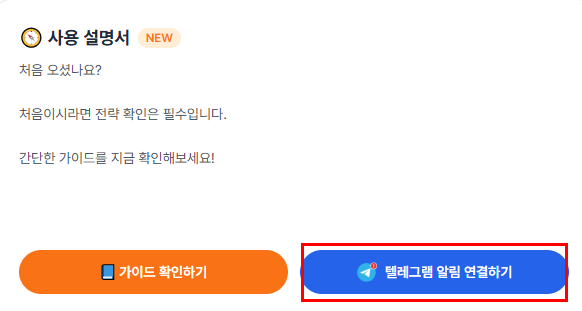
- Click Connect to Telegram Alerts.
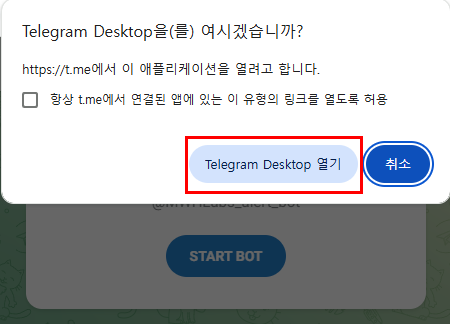
- On desktop, click the Open button.
- On mobile, Telegram will open automatically.
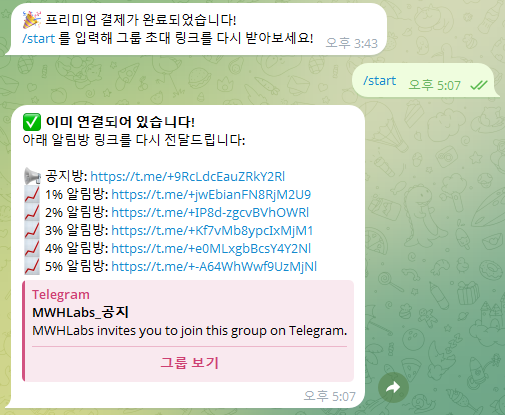
- When connecting to Telegram, the
/startcommand is automatically sent. - If it is not sent automatically, please enter
/startmanually. - Once
/startis entered, we will send you the alert group invitation link. - Select the desired alert group from the provided links to join.
- The alert groups provide GAP notifications as a percentage, based on the Premium plan.
- Alerts are sent every 20 minutes starting 1 hour before the funding time ends.
- If you have any questions, please contact our support team.
- Support: https://t.me/mwhlabs
-
•
Alerts are based on Premium GAP values and are calculated as percentages.
-
•
If you’d like to receive all alerts, joining the 1% alert group is sufficient.
-
•
Each alert group sends notifications when the GAP exceeds the specified percentage.
Last updated